

Evidence basis: Stuart's confirmed prior product use and editorial analysis of documented features. This guide does not present a recorded current performance test. How we review tools and services.
An invoice identifies the work, the parties, the amount owed and when payment is due. Start with the template below, use the terms already agreed with your client, and keep a copy of exactly what you send.
Get the invoice template
Download the editable freelance invoice (.xlsx). It contains a blank invoice and a fictional completed example. No signup is required. Open it in Excel or import it into your spreadsheet app; edit the yellow cells and check the calculated total before exporting the invoice sheet to PDF.
Invoice INV-2026-001
Fictional example: Alex Example, trading as Example Writing, invoices Sample Studio Ltd. Both parties must supply their full real addresses before an actual invoice is issued.
Issued: 9 September 2026
Services supplied: 8 September 2026
Agreed payment date: 23 September 2026
Project: DEMO-WEB-01
| Work | Quantity | Rate | Amount |
|---|---|---|---|
| Website copy, agreed draft | 6 hours | £50.00 | £300.00 |
| One agreed revision round | 2 hours | £50.00 | £100.00 |
| Total due (VAT not charged) | £400.00 | ||
Payment: use the agreed method and verified payment details. Ask the client to quote INV-2026-001. The 14-day interval in this example is an agreed term, not a universal payment rule.
Complete the essential details
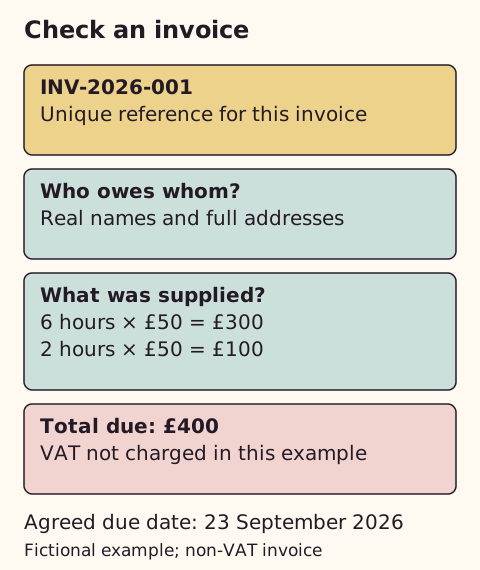
GOV.UK requires a unique invoice identifier, supplier and customer details, a clear account of the goods or services, the supply and invoice dates, the charges, VAT where applicable and the total. A sole trader also includes their own name, any trading name and, when using a business name, an address for legal documents. A limited company uses its full incorporated name; naming any directors means naming all of them.
Add the purchase-order reference if the customer requires one, the agreed due date, payment reference and a contact for queries. Check who actually owes the money: a brand name or the person who commissioned the work may not be the legal customer.
Describe what was agreed
Use a description a finance team can match to an approved brief. “Website copy, six agreed hours, project DEMO-WEB-01” is easier to reconcile than “services”. For a fixed fee, use one project or milestone quantity and the agreed fee. A time log can support that invoice, but it does not turn extra hours into an authorised extra charge.
Check quantities against your timesheet. Confirm deposits already received, approved expenses and any credit separately so you do not charge twice. Agree fees and due dates through the contract discussion before invoicing.
Send it and keep a record
- Confirm the billing name, address, purchase order and accounts contact.
- Replace every bracketed field and confirm the dates. Check each line and the final amount independently.
- Export only the completed invoice sheet to PDF. Use print preview and fit the sheet to one page wide so no amount is cut off.
- Send the PDF with a short subject such as “Invoice INV-2026-001: website copy”. State the amount and agreed due date.
- Log the sent date, due date, amount, payment and any query. Keep the invoice and supporting agreement in your records.
Verify unexpected requests to change bank details using a trusted contact route. Do not assume an email thread alone proves that a new payment destination is genuine.
When does software help?
I have used FreshBooks. My recommendation for a first invoice is to start with the simplest method you can maintain accurately, then consider software when the administration becomes repetitive.
A document and a small register can be enough for occasional invoices when you reliably check dates and payments. Consider software when repeated billing, time entries or reminders are consuming time or producing mistakes.
FreshBooks combines invoice and time records with other finance features. Its client limits and the total ongoing bill matter more than the introductory discount. Compare the equivalent task below before subscribing.
Compare the same first-invoice job
For one freelancer sending ordinary service invoices, I would choose the template for occasional work, Zoho Invoice when reminders and time records are needed without a software subscription, and FreshBooks when its wider accounting workflow justifies the recurring charge. These are editorial choices from documented features, not a timed comparison of my accounts.
| Option | Practical advantage | Limitation to check |
|---|---|---|
| This template and a register | No additional invoicing subscription when you already have a suitable spreadsheet app. | You send reminders, reconcile payments and maintain versions yourself. |
| Zoho Invoice | Free invoicing with time tracking and reminders. | Separate from full accounting and tax-filing software. |
| FreshBooks Lite | Invoicing, time tracking and a wider finance workflow in one service. | Five billable clients; a sixth requires another plan or a legitimate change to the client record. |
Zoho's pricing conditions list two users, three projects and 500 invoices a year. The project limit can matter before the invoice limit for a freelancer juggling several jobs. These are different limits from FreshBooks' client count; do not compare the numbers as if they measure the same thing. Payment-provider charges can still apply to free invoicing software.
First-year cost versus the ongoing bill
Using the FreshBooks UK monthly prices checked on 2 October 2026, Lite at £8 for three months then £16 for nine totals £168 in year one. Twelve months at £16 totals £192. Plus at £15 for three months then £30 for nine totals £315, compared with £360 for twelve standard-price months. These calculations assume eligibility, unchanged prices and monthly billing; they exclude additional users, payment fees and any tax added at checkout. They are not annual-plan quotes.
My cost-first software choice for basic invoicing is Zoho Invoice if its limits fit. FreshBooks is the stronger candidate when you need the wider workflow and have checked its suitability with whoever handles your accounts. I would not pay simply for a more formal-looking invoice or claim that either tool makes clients pay faster without actual evidence.
Before you switch invoice systems
This is an editorial assessment of the work involved, not a timed usability test. Try one representative task before migrating live records or committing to a plan.
| Route | When it fits | When another route is better | Setup and connections to check |
|---|---|---|---|
| Template and register | Occasional invoices you can check yourself. | Use software when chasing and reconciling repeat work creates errors. | Keep numbering, due dates, payment records and backups consistent. |
| Zoho Invoice | Recurring basic invoicing within its project and invoice limits. | Choose a separate accounting solution if invoicing alone does not meet your reporting needs. | Configure client details, payment terms and reminders; confirm your payment provider and accounting export. |
| FreshBooks | Connected time, invoices and finance work that justify a subscription. | Avoid buying it just to send one more formal-looking invoice, or selecting a plan below your client count. | Check the client count, accountant access, payment fees and your required bank or app connection before migrating. |
Use FreshBooks UK plans to check your actual requirements. The comparison above uses official information. Your tax and reporting requirements need their own suitability check.
Sources
- FreshBooks: App integration directory
- Zoho Invoice: UK pricing and limits
- Zoho Invoice: UK features
- GOV.UK: What invoices must include
- FreshBooks: Creating an invoice
- FreshBooks: UK plans and features
Initial source checks: 9 September 2026. Later checks are dated in the relevant passages. External information can change.
Spot something that needs correcting? See the corrections process.