

Evidence basis: Stuart's confirmed prior product use and editorial analysis of documented features. This guide does not present a recorded current performance test. How we review tools and services.
Record time while the work is fresh, mark whether the agreement permits billing, and separate approved work from anything still being queried. A recorded hour and an invoiceable hour are different things.
Download the working timesheet
Download the freelance timesheet (.xlsx). Use the blank Timesheet tab for your work and Example week to see the formulas in action. It includes date, client/project, task, duration, billable status, hourly rate, approval and invoice reference.
Enter durations as h:mm: 1:30 is one hour and 30 minutes. Do not type 1.30 to mean 90 minutes. The decimal-hours column converts the time for billing. Use one row per task and split sessions spanning midnight into separate dated rows. The template flags durations of 24 hours or more for checking.
A completed hypothetical week
| Task | Duration | Billing position | Ready to invoice |
|---|---|---|---|
| Draft copy | 2:30 | Billable, approved | £125.00 |
| Own business admin | 0:45 | Non-billable | £0.00 |
| Editing | 1:30 | Billable, approved | £75.00 |
| Extra revision | 1:00 | Awaiting approval | £0.00 |
| Final checks | 0:30 | Already invoiced | £0.00 |
| Total recorded | 6:15 (6.25 hours) | Ready amount | £200.00 |
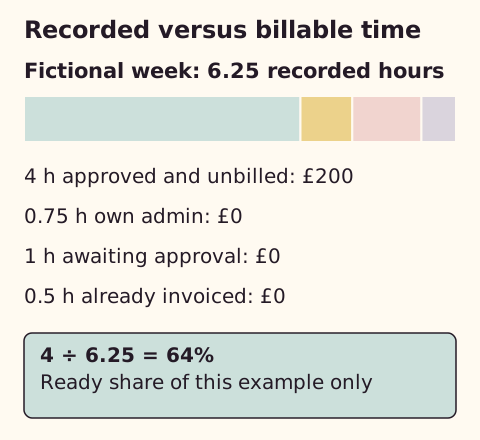
The ready amount includes only billable rows that are approved (or genuinely do not require approval) and have no invoice reference. After invoicing the four approved, unbilled hours, enter the invoice reference on those rows. Their ready amount becomes zero, which helps prevent billing them twice.
Define billable work first
Check the agreed scope and charging basis. Delivery work, meetings, travel and revisions may have different rules. Label an extra request “Pending” until it is authorised. “Not required” is for an agreement that does not require an additional approval step; it is not a shortcut around a disputed charge.
Use a short daily routine
- Start a timer or note the start time when beginning one task.
- Stop for breaks and task changes. Avoid overlapping timers.
- Record the task and actual duration before the end of the day.
- Check missed entries against your calendar or work record. Label an estimate rather than manufacturing precision.
- At the weekly review, resolve pending items and confirm the agreed rate.
Keep an audit note when correcting a material entry: original duration, corrected duration and reason. Store the sheet securely because client names and project details may be confidential. This downloadable workbook runs in your spreadsheet application; The Coven does not receive your entries.
What if the project has a fixed fee?
Track time to understand capacity, but invoice the agreed project fee. A hypothetical £600 project taking 12 hours produces £50 per recorded hour before expenses and tax. If it takes 16 hours, that falls to £37.50. The extra four hours do not automatically entitle you to charge more.
Compare that evidence with the assumptions in the rate calculator. Use it when scoping the next project rather than rewriting an existing agreement after delivery.
When a spreadsheet stops being enough
I have used FreshBooks. For this workflow, I recommend deciding how you will approve and invoice time before choosing a tracking tool.
A manual timer and this sheet can work well for a small number of projects. FreshBooks documents both timers and manual entries, billable flags and later billing of recorded time. Client limits, subscriptions and payment fees still matter; see the invoice guide’s cost notes.
A sheet, a dedicated timer or integrated billing?
For one freelancer recording time and checking approval, I would use this sheet when the daily habit already works. If starting and stopping sessions is the weak point, Toggl's Free plan is a relevant alternative: its documentation lists manual entries and live timers. Billable rates belong to a paid tier, so compare Free plus your own rate-and-approval sheet with the manual method, not with a complete billing system. This is a feature assessment checked on 23 September 2026, not a usability or accuracy test.
FreshBooks is the alternative when repeatedly moving approved time into invoices is the specific burden. My preferred sequence is to fix recording first, approval second and invoice transfer third. Paying for integration will not correct a forgotten timer or authorise out-of-scope work. Keep the manual option if it is reliable; use the invoice comparison before taking on a wider subscription.
Measure a process change without claiming invented savings
Use comparable work periods and record time spent entering, checking and transferring entries, plus corrections. For example, if a hypothetical monthly process takes 90 minutes before a change and 55 afterwards, the difference is 35 minutes. At an assumed £30 an hour, that capacity is worth £17.50. It is not cash saved unless the time can actually be redeployed or a cost removed. Include setup and learning time before deciding a paid tool is worthwhile.
The worked week above has 6.25 recorded hours but only four ready to invoice. Four divided by 6.25 is 64%; that is the ready-to-invoice share of this fictional record, not an industry utilisation target.
After comparing the manual, timer and billing options, check FreshBooks UK plans if transferring approved hours into invoices remains the problem.
Sources
Initial source checks: 9 September 2026. Later checks are dated in the relevant passages. External information can change.
Spot something that needs correcting? See the corrections process.