

Evidence basis: Stuart's confirmed prior product use and editorial analysis of documented features. This guide does not present a recorded current performance test. How we review tools and services.
Build an email list by giving a defined audience a useful reason to subscribe, explaining what they will receive, recording their permission and delivering the promised resource. Start with one working signup journey before adding more forms or automations.
A complete example journey
Illustrative business: an independent copywriter helps small studios prepare website briefs. The resource is a one-page briefing worksheet. The service is a paid website-copy project. These are fictional examples, not reported clients or results.
- A useful article explains why unclear briefs delay a website project.
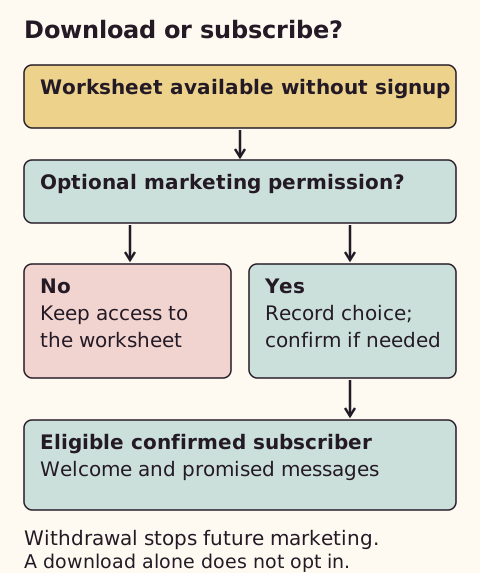
- A page offers a free briefing worksheet, available immediately without a subscription.
- An optional, unticked checkbox offers the copywriter’s email tips and occasional service offers.
- Confirmed subscribers receive a welcome message with the worksheet link and one small action.
- Later messages help use the worksheet and invite a suitable enquiry.
Keeping a resource available separately makes the choice easy to understand. A download alone is not permission for an ongoing marketing sequence.
Is a list useful yet?
If you cannot name the reader, the useful promise and a realistic way people will find the signup page, begin with positioning and conversations. An empty list does not fix an unclear offer. A list becomes useful when people may need time or repeated relevant information before enquiring.
Write a clear permission step
Optional email signup (checkbox starts unticked):

Yes, send me [business name]’s practical website-briefing tips twice a month and occasional offers for its copywriting services. I can unsubscribe at any time.

[Link to your actual privacy notice]

Button: Subscribe to briefing tips
Adapt the business name, subject and frequency to what you will actually send. Keep a record of the wording shown, when and how permission was given, and later withdrawals. Explain relevant personal-data use in your privacy information.
Choose a platform for the actual workflow
I have used MailerLite. For a new service-business list, I recommend starting with one useful signup promise and one welcome email before building a longer sequence.
A dedicated email platform can maintain subscription status, provide unsubscribe links and run welcome messages. A personal inbox or spreadsheet alone is a poor substitute for a recurring marketing list. Delaying a list is a reasonable free option if your audience and promise are not ready.
MailerLite is one candidate. Its pricing page checked on 2 October 2026 listed a free plan for up to 250 subscribers and 2,500 monthly emails, with three active automations, five steps per automation and three signup forms. These limits may differ from older articles. A four-email sequence with delays can exceed five steps; start with one welcome email or check the paid plan required for the fuller workflow.
MailerLite Free or Brevo Free for the same starting list?
For one owner, 200 subscribers, two newsletters a month and one welcome email, my starting choice is MailerLite Free. The workflow stays small and its documented monthly allowance gives room for this example. Brevo Free is a credible alternative when a larger contact base sends infrequently, but its daily limit needs more attention. These are task-fit judgments from official limits, not a deliverability ranking.
| Plan | Constraint that matters here | Practical tradeoff |
|---|---|---|
| MailerLite Free | 250 subscribers; 2,500 sends monthly; five steps per automation. | A small list fits, but a longer sequence can hit the workflow limit first. |
| Brevo Free | 300 sends daily; one user; up to 2,000 unique automation entrants. | Unused daily sends do not roll over; a larger campaign cannot all go out on one day. |
Calculate sending needs before upgrading
In the hypothetical 200-person list, two full newsletters use 400 sends. Twenty new people each receiving one welcome add 20: 420 sends altogether, before other messages. If all 200 also receive a four-email sequence that month, the newsletters plus sequence use 1,200 sends. Volume can fit while automation steps do not. These are capacity calculations, not delivered-email results.
For Brevo, a 500-person campaign requires at least two days under its 300-per-day free allowance, assuming no other sends consume it and you follow its requeue process. I would not use that plan for a time-sensitive same-day message to all 500. Check the paid plan against the same subscriber count, peak-day volume and required automation before comparing prices.
Connect the form and sender
- Create a subscriber group for this specific promise and connect the form to it.
- Set the sender name to the business readers recognise and use a monitored reply address.
- Follow the provider’s domain-authentication instructions. Use the records shown for your own domain; do not copy another business’s DNS values.
- Configure confirmation where appropriate and start the welcome after the required confirmation, not while it is pending.
- Add the resource link and the platform’s working unsubscribe mechanism.
MailerLite’s documentation describes verification and authentication as separate steps. Authentication helps identify an authorised sender; it does not guarantee inbox placement. Use the current authentication instructions for your own domain and check the complete subscriber journey before inviting signups.
Send one useful welcome
Subject: Your website briefing worksheet

Thanks for subscribing to [business name]’s briefing tips. Here is the worksheet: [resource link]. Start with the box describing who the page is for and what they need to do.

You will receive [actual frequency and subject]. You can unsubscribe using the link below whenever this is no longer useful.

[Sender name and working unsubscribe link]
Check before inviting subscribers
Use an address you control. Check the form, confirmation, resource download, sender name, reply route and unsubscribe. Check a refusal leaves the visitor unsubscribed. Confirm that an unsubscribed test contact cannot continue through the welcome workflow. Record what you observe; sending a preview email alone does not test the complete journey.
Keep a small measurement sheet
| Week | Consented signups | Useful replies | Qualified enquiries | Unsubscribes | Next change |
|---|---|---|---|---|---|
| [Starting date] | [Count] | [Count] | [Count] | [Count] | [One test] |
Open rates are affected by privacy features and automated activity. Prefer relevant replies and qualified enquiries over treating an open as buying intent.
Setup and switching checks for a service-business list
This is an editorial assessment of the work involved, not a timed usability test. Try one representative task before migrating live records or committing to a plan.
| Route | When it fits | When another route is better | Setup and connections to check |
|---|---|---|---|
| Delay the list | Your audience, signup promise or route to enquiries is unclear. | Delay is a poor fit when people already ask for useful follow-up and you can sustain it. | Clarify the offer and promise before committing to a platform. |
| MailerLite Free | A small list and simple welcome within the documented limits. | Choose another plan or route when the subscriber ceiling or five-step workflow does not fit. | Configure the form and sender domain; test confirmation, delivery, replies and unsubscribe. Check the exact website or CRM connection. |
| Brevo Free | Infrequent campaigns where daily volume can remain within its allowance. | Avoid it for a same-day campaign to more contacts than the daily allowance permits. | Plan sends around the daily cap and automation entrant limit; test suppression and any connector costs. |
Paid pricing depends on subscriber tier and billing choice. Check the current currency, taxes, renewal cost and sending allowance through MailerLite plans. For a broader comparison, the small-business email tools guide has a different remit.
Sources
- MailerLite: Integration directory
- Brevo: Free-plan limits
- ICO: Electronic mail marketing rules
- ICO: Business-to-business marketing
- MailerLite: Current plans and limits
- MailerLite: Authenticate your domain
Initial source checks: 9 September 2026. Later checks are dated in the relevant passages. External information can change.
Spot something that needs correcting? See the corrections process.