

Evidence basis: Stuart's confirmed prior product use and editorial analysis of documented features. This guide does not present a recorded current performance test. How we review tools and services.
A welcome sequence should deliver the promise, help the subscriber use it and offer a relevant next step. The four emails here are an adaptable example for a service business, not a proven optimum or a guarantee of enquiries.
Use this only for people eligible to receive the messages you intend to send. A resource request alone does not authorise a marketing sequence. Set up the permission and confirmation journey first.
Email 1: deliver the resource
Subject: Your [resource name] is here

Hello [first name or a neutral greeting],

Thanks for subscribing to [business name]’s [topic] emails. Here is the [resource] you requested: [working link].

Start with [one small action]. You do not need to complete every section today.

Over the next week I will send a few practical notes to help you use it, including [accurate topic]. After that, expect [actual ongoing frequency], including occasional information about my services.

[Your name and business]
[Working unsubscribe link]
Email 2: help them use it
Subject: Start with this part of [resource name]

Hello [name],

If you have ten minutes, complete [specific section] in your [resource]: [link].

For example, [clearly labelled hypothetical example]. The point is to make [one decision] before you spend time on [later task].

If you are stuck, reply with the question you are trying to answer. Please do not include confidential client or personal information.

[Your name and business]
[Working unsubscribe link]
Email 3: explain a relevant approach
Subject: How I approach [specific problem]

Hello [name],

When working on [type of task], my approach is to [brief description you can honestly substantiate].

Here is an example: [link to authorised work, or an explicitly labelled self-initiated example]. Notice [decision visible in that work] and why it matters to [reader’s task].

[State the outcome only if you have evidence. If it is an illustrative exercise, explain what it demonstrates without claiming client results.]

You can use the same question when reviewing your own [work].

[Your name and business]
[Working unsubscribe link]
Email 4: offer a proportionate next step
Subject: Need help with [specific next task]?

Hello [name],

If the [resource] has helped you identify [problem], the next step may be [small, concrete action].

I offer [accurate service and scope] for [suitable client]. It is most useful when [fit criteria]. If [poor-fit condition], [helpful alternative] may be enough for now.

To discuss it, [reply with a short summary / use a working enquiry link]. I will explain whether I can help and the next step before any commitment.

You are welcome to keep using the resource without buying anything.

[Your name and business]
[Working unsubscribe link]
Entry, timing and exits
| Step | Trigger / timing | Exit or check |
|---|---|---|
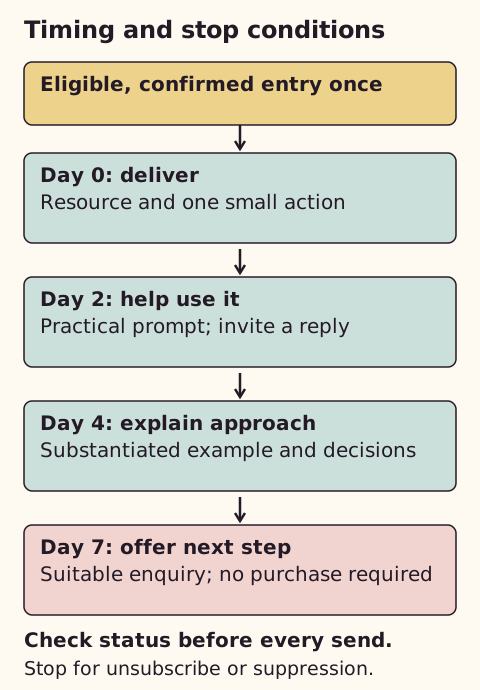
| Enter once | Eligible subscriber joins the specific group after required confirmation | Exclude unsubscribed, suppressed or already-completed contacts |
| Email 1 | Immediately after entry | Check the resource URL and subscriber status |
| Email 2 | Wait two days | Stop if unsubscribed or suppressed |
| Email 3 | Wait another two days | Use only substantiated claims; pause for a human conversation where appropriate |
| Email 4 | Wait another three days | Exclude people already in the enquiry/client path |
| Finish | Mark sequence complete | Do not restart merely because the form is submitted again |
These intervals are an editorial starting point. Match the frequency promised at signup. Do not make an email open the only condition for progressing; privacy protections and automated scans distort open data.
Check the automation limits
I have used MailerLite. My recommendation is to map the messages, delays and stop conditions before choosing a plan, then check that your account supports that workflow.
MailerLite’s current free plan lists five steps per automation and three active automations. Four email actions plus three delays already require seven actions before additional conditions, so do not assume this complete sequence fits. Use one immediate welcome email initially, or compare a paid plan with an alternative workflow. Its documentation provides a welcome-workflow example, but your account’s available controls determine the exact setup.
A complete fictional sequence
This example is for the fictional copywriter Alex Example, whose subscribers opted into website-briefing tips and occasional service offers. It is sample copy, not Stuart's client history or a record of sent emails. In a real campaign, connect the actual worksheet and the platform's unsubscribe control, and match the frequency promised at signup.
Email 1: Your website briefing worksheet
Thanks for subscribing to my website-briefing tips. Your worksheet helps you describe the reader, purpose, evidence and next action for one page. Start with the reader box: name the person who needs this page and the question they need it to answer. Over the next week I will send three short notes to help you use the brief. After that, I send two practical emails a month, sometimes including information about my copywriting service. You can unsubscribe whenever these notes are no longer useful.
Email 2: Choose one job for the page
Open the purpose box in your worksheet and finish this sentence: “After reading this page, a suitable visitor should be able to...” For a fictional design studio's service page, the answer might be “understand what a small website project includes and decide whether to enquire”. That is more useful than “be impressed”. If your answer contains several unrelated jobs, choose the one that matters most to this page. Reply with the decision you are stuck on, without including private client information.
Email 3: Show the evidence behind the promise
In this fictional studio example, I would put the intended customer and deliverables before the studio biography. I would then place a clearly labelled sample beside the service description so a reader can judge the work. That is an editorial approach, not a claim of increased enquiries. In your own brief, list what you can show with permission: an extract, annotated image or accurate project account. If a result was never measured, explain the decision the work demonstrates instead.
Email 4: Ready to turn the brief into copy?
If your worksheet now identifies the reader, service and supporting evidence, you have a useful starting point for drafting. Alex Example's fictional service is a scoped homepage and service-page copy project with one consolidated revision round. It suits a business with an agreed offer and source material ready. If those are still uncertain, keep working on the brief before paying for copy. To discuss the project, reply with the pages you need and your intended timing. You can keep using the worksheet without buying anything.
One welcome email or all four?
I would choose one immediate welcome for an untested signup promise: it fulfils the commitment with fewer moving parts. Use all four only when each message has a distinct job and the permissions, stop conditions and plan support the journey. In the plan comparison checked on 2 October 2026, Comfort allows 100 steps per automation; Free allows five. Seven message-and-delay actions therefore need a different arrangement from Free. That capacity check does not establish successful delivery.
For a competing free workflow, Brevo includes automation subject to contact and sending limits. I would assess it when a longer workflow is essential and daily volume stays low, then test the exact exits before activation. The email-list comparison explains the volume tradeoff. I would not split automations merely to evade a plan limit if that makes duplicate entry or unsubscribe handling harder to verify.
Measure one defined group
Hypothetical example: of 40 eligible people entering a sequence, four send relevant replies and one makes a qualified enquiry during the chosen observation window. That is 10% replying and 2.5% enquiring; the enquiry may be among the four replies, so do not add the percentages. Record actual entry and observation dates, bounces, unsubscribes and unfinished journeys. These invented counts explain the method and are not expected results or evidence that four emails outperform one.
Test the actual journey
Replace all bracketed copy. Check links, fallback greetings, sender identity and the unsubscribe route using an address you control. Test entry once, a repeated form submission and an unsubscribe between messages. Keep the automation off until the intended behaviour is observed. This article provides a test procedure; it does not claim that emails have been delivered from your account.
Measure helpful replies, useful link actions, qualified enquiries and unsubscribes. A sale belongs in your actual sales records; it cannot be inferred from an email open.
Once you have compared one welcome, a fuller sequence and the alternative platform, use MailerLite’s plan comparison to confirm the required steps, sending allowance and total cost.
Sources
- Brevo: Plan features
- MailerLite: Welcome workflow example
- MailerLite: Current automation limits
- ICO: Electronic mail marketing rules
Initial source checks: 9 September 2026. Later checks are dated in the relevant passages. External information can change.
Spot something that needs correcting? See the corrections process.